安装rabbitmq-c
rabbitmq-c是一个用于C语言的,与AMQP server进行交互的client库。rabbitmq-c与server进行交互前需要首先进行login操作,在操作后,可以根据AMQP协议规范,执行一系列操作。
我们先来安装client库
https://github.com/alanxz/rabbitmq-c/releases

我centos 复制tar.gz这个
[root@localhost ~]# wget https://github.com/alanxz/rabbitmq-c/archive/v0.10.0.tar.gz
下载完解压并安装 参考官方https://github.com/alanxz/rabbitmq-c/tree/v0.10.0
[root@localhost ~]# tar zxvf v0.10.0.tar.gz
[root@localhost ~]# cd rabbitmq-c-0.10.0/
[root@localho[root@localhost build]# cmake -DCMAKE_INSTALL_PREFIX=/usr/local/rabbitmq-c ..st rabbitmq-c-0.10.0]# mkdir build && cd build
[root@localhost build]# cmake --build .  --target install
可以看一下/usr/local/rabbitmq-c下的目录只有include和lib64。
因为后面编译安装amqp扩展的时候系统会到/usr/local/rabbitmq-c/lib目录下搜索依赖库,导致错误。
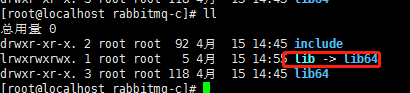
所以我们加个软链接:
[root@localhost rabbitmq-c]# cd /usr/local/rabbitmq-c/
[root@localhost rabbitmq-c]# ln -s lib64 lib
安装php扩展
我们去php扩展库找:http://pecl.php.net/package/amqp
目前最新的是:1.10.2
我们把它下载下来并安装
[root@localhost ~]# wget http://pecl.php.net/get/amqp-1.10.2.tgz
[root@localhost ~]# tar zxf amqp-1.10.2.tgz
[root@localhost ~]# cd amqp-1.10.2
这时候运行phpize(现在添加扩展和5版本不一样,都是phpize去加的 参考:https://blog.csdn.net/weixin_38674371/article/details/84714696)[root@localhost amqp-1.10.2]# phpize
编译参数 phpconfig 是php目录下的 php-config,根据自己安装的环境不同去配置目录。
rabbitmq-dir则是我们上面安装rabbitmq-c时填写的 DCMAKE_INSTALL_PREFIX
[root@localhost amqp-1.10.2]# ./configure --with-php-config=/www/server/php/73/bin/php-config --with-amqp --with-librabbitmq-dir=/usr/local/rabbitmq-c
[root@localhost amqp-1.10.2]# make && make install
然后我们去添加php扩展
[root@localhost ~]# cd /www/server/php/73/etc
[root@localhost etc]# vim php.ini
在文件末尾加入 /www/server/php/73/lib/php/extensions/no-debug-non-zts-20180731/amqp.so
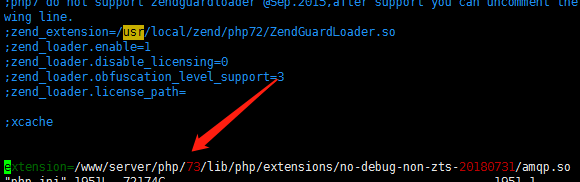
ps:这是我环境的,,,因为为我php环境用的宝塔!!! php目录是/www/server/php/73/ 那么我刚安装的扩展会被拉到/www/server/php/73/lib/php/extensions/no-de***/amqp.so
保存后重启php[root@localhost etc]# service php-fpm-73 restart
重启后php -m查看是否有成功装了amqp扩展(也可以phpinfo查看)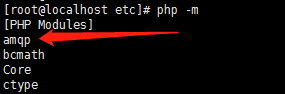
有的话就成功了